Welcome to week 2 of the Indie Development Project. Previously, I began working with Unreal Engine 4 by implementing blueprint actors that would do specific actions such as movement or changing an object when the player approaches it and then adding these to the game’s world. Also, I experimented on several different blueprint ideas, such as shooting projectiles from the player and using them to hit targets that would allow for a platform to move once all targets have been hit. I also implemented a sprint mechanic with the player that makes them move faster in the world when a specific key is held down.
This week, I look into making two different ideas to implement to my tutorial project of Unreal Engine 4. These ideas were to make a box that can be destroyed with the implemented projectiles and spawn a coin that the player can collect and allow the game to switch and override the controls between different other characters present in the game world.
First, I started with implementing the box idea that would drop a coin once destroyed from the players projectiles.
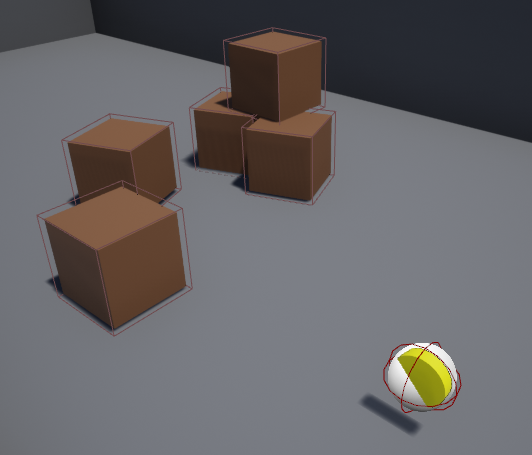
In the scene (Figure 1), you have a yellow circle representing the coin and several brown cubes representing the boxes that the player can destroy with their projectiles. These colour materials were used for these objects to quickly identify the gold of the coin and the box’s wood that was fragile enough to be destroyed.
Each of the game objects has its own blueprint for what it can do in the game world. Below is the Coin blueprint.
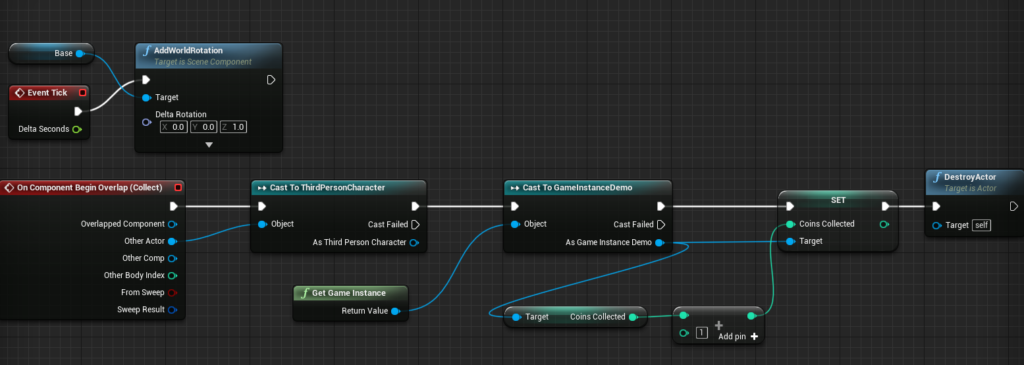
In the blueprint (Figure 2), an event tick is used toward the object that makes it rotate in the Z-axis every tick. This is done to draw more attention to the coin to represent them as a form of collectable that the player can collect. However, a Begin Overlap event is also used whenever the player collides with the object by casting to the actor. Should the player collide with the coin, the game will then be cast to the GameInstanceDemo, which holds all global variables for the scene and target and gets the variable “Coins Collected”. This will then add “1” with the current value of “Coins Collected” and then set its new value and finally destroy the Coin actor. In the future, I could use the “Coin Collected” value toward implementing a UI in Unreal Engine 4 that display the current coins the player has collected and use them to add as a requirement to completing a level or opening a door. This idea would not only be good to do but also present me with the idea to explore UI around Unreal Engine 4 as it is one area I have not looked at before.
Next is the box blueprint, as seen below.
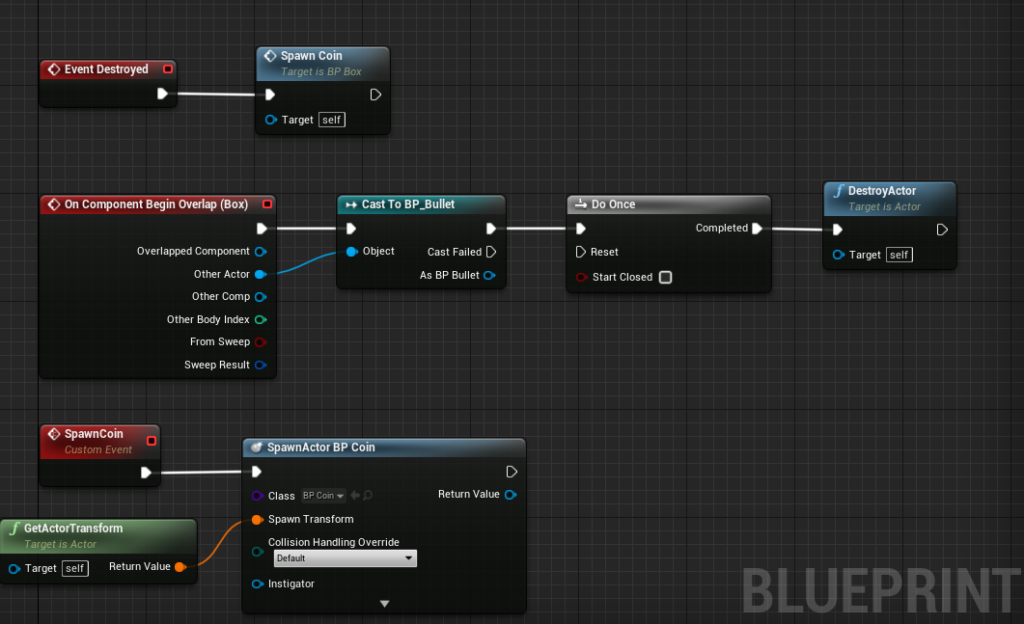
In the blueprint (Figure 3), the bullet blueprint actor is cast to the Begin Overlap event, where once the bullet enters the box collision, the event will play a do once trigger to destroy the box actor. The Do Once was explicitly used here to prevent bugs of the game trying to call the event at all times with the bullet overlapping the box. After the box has been destroyed, another event is played to call on a custom Event called “SpawnCoin”. The “SpawnCoin” event will spawn in a new Coin blueprint actor by spawning it from where the box was placed in the scene by getting it spawn transform. Below is the before and after of the player destroying all the boxes in the scene, with coins being spawned after each one is destroyed.
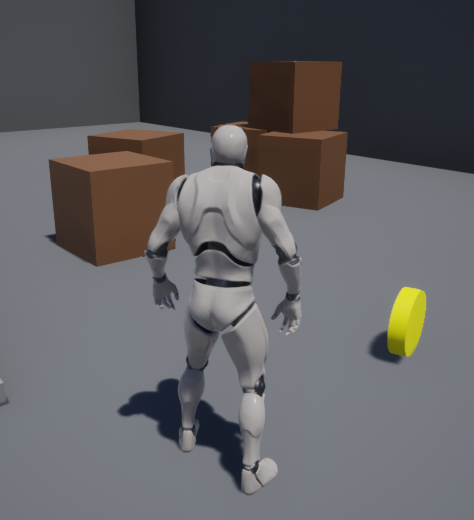
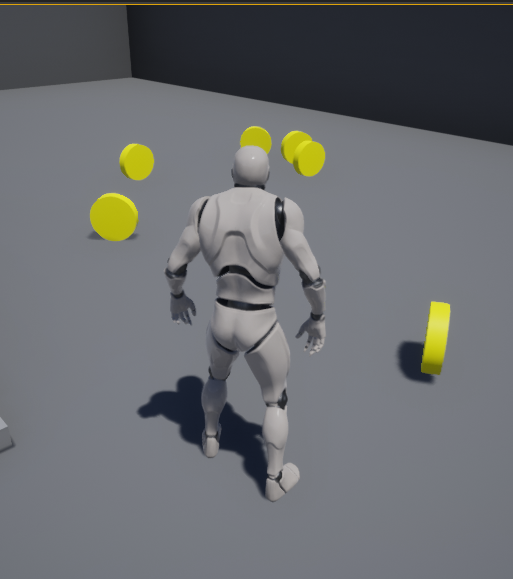
From looking toward future ideas to explore with the box blueprint, I would like to add in some particles effect to give a more impact visual effect toward the player destroying as feedback as currently, the object just disappear upon collision. I see this idea as worth exploring because it would allow me to explore the particles system of Unreal Engine 4 as it is an area I have not looked at before and could expand my skill using the engine more.
The next idea was looking around how I could make the game switch controls and override with another character during the game. To understand how to implement the, I needed to look into the pawn class as this is the base class that can be controlled by the player but also by AI. Using the Pawn, it was best to work with player movement as AI would require more time to implement toward how they could interact with the game world. Pawn is represented with what actors have, but the differences that Pawn has a relationship between the controllers and the class allow the moment of that class. However, only one Pawn can be controlled by the player at once. I loaded in the Level Blueprint, which acts as a wide global event graph, to get around implementing the idea.
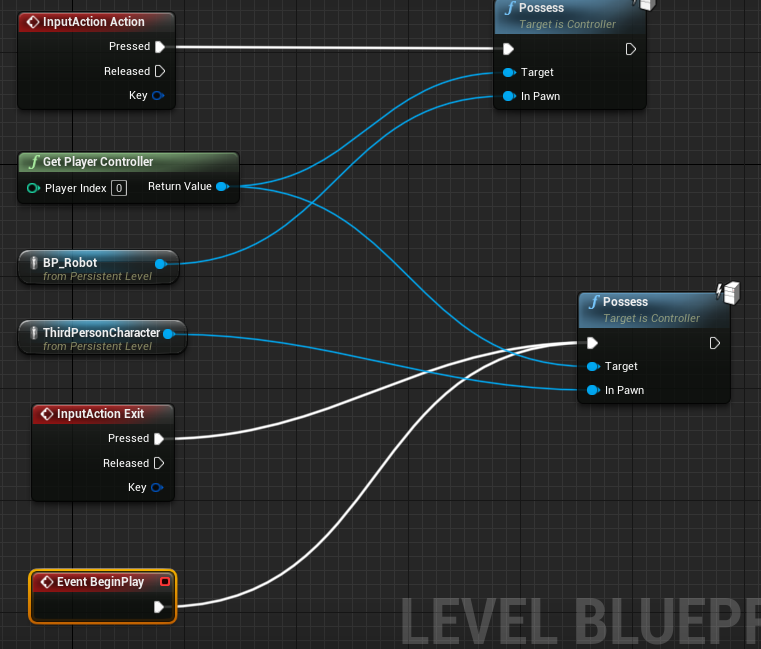
In the blueprint (Figure 6), I selected the objects I wanted to allow controls and created references of the objects. This is needed to where a node called “Possess” that will switch the controls across to the referenced Pawn object. When the game is loaded, controls are possessed to the “ThirdPersonCharacter” as the humanoid and later can be switched to the flying robot as “BP_Robot. Along with getting the object references, a player controller uses the current input available in the scene.
With the “Possesses” node in place, an input event is connected to the “Possesses” that when a specific key is pressed, the game controls will automatically switch over to that character. How this works is that when the player presses “E” Action input is used to possess control to the robot and then can be moved around the game. To switch back to the starting character the player can press “R” to get the Exit Input loaded to switch control back. Below is a screenshot of the two characters with the robot currently being controlled.
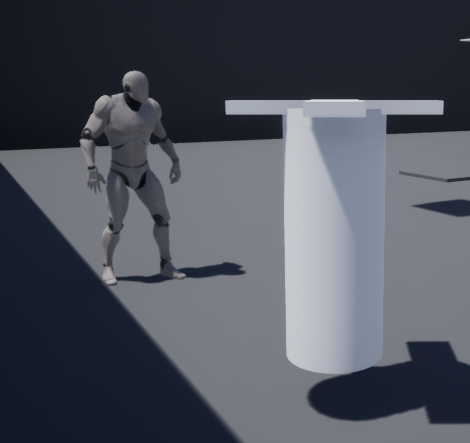
From implementing the idea, I thought more toward where I could make a co-op based mechanic with switching controls, where the player will need to operate the robot through a being near a panel. Being near the panel would allow the player to remote control the robot character and use the robot to press a switch somewhere else to open the door to progress the main character more into the level.
With how this week turned out for working with Unreal Engine 4, I did find implementing the coin/boxes mechanics easy to do as I could see how the logic worked between collecting the items and destroying the box. The switching control between characters was overall challenging since I had never experimented with switching character mechanics before but required understanding how the Pawn class worked and figuring out how to get possession of another character.