Welcome to Week 5 of my Development Diary. The focus of this week is to begin developing a 2D prototype by using the skills and knowledge I previously built on from learning throughout the programming fundamentals to create a game project. The project itself must contain instruction on how to play the game, collectable that the player can collect, enemies that can interact with the player and finally, a win condition.
Before I even begin to do any coding and preparing assets for the game. I first needed to come up with some ideas as to what the genre of the prototype was going to be and the mechanics that would feature. I thought of doing a platformer for the prototype because this would be the best option since the genre does not require any complex mechanics to make. However, I want to challenge myself by developing a shooter mechanic for the prototype because this is a mechanic I have not done before. Still, it will help me understand how to make any shooter mechanic for a game generally. To see how the prototype could look, I drew a concept design to help plan how I want the UI to layout later and how the gameplay could look once I start coding the game.

the items and the enemies because they would not be too time-consuming to develop since the enemies could efficiently work well on two animation frames, and the items that the player can collect would not need to be too detailed. However, the player character and the tilemap will need to be pre-made since this would require more time to produce, such as the different tiles on how these can create the game world and the number of frames the player character will need to perform the different actions in the game. These actions would consist of walking, jumping and falling. Below are some examples of the assets I produced such as a coin that the player collect to gain points, a standard that the player can encounter and a pistol that is used for the UI, as well as pre-made assets to cut development time for the project.




With the assets prepared and having an idea thought out, it was the next time to begin coding the prototype. To help save time around developing the prototype, I referred back to some old code that I created in some of my previous projects mentioned in the past blog as I remember some of the features I made would be helpful toward the project. This includes using a timer to create the speed up and when the player can retake damage, getting a tile index to allow them to perform specific functions when the player overlaps them, and the basic platformer controls. I took this approach because I can see that the previous code was fit enough to be reusable for this project, and it made sense to use these as this would save a lot of time toward getting the basic mechanics working.
However, the main challenge with the project is getting the shooting mechanic working in the game where the player character will shoot bullets based on the direction they are facing. To do this, I firstly look online on Phaser 3 Examples of how to create bullets by analyzing the example code on their website to see how the code function. After testing around the example code, I then started to build my bullet into the prototype. This was done by first creating a physics group for the bullet of when to call the group, whether it must collide to the world bound, and adjusting the max size to show the number of bullets in the game world.

With the bullet group created, I then needed to set collision to the bullet toward the platforms and the world boundary so that the object created could be destroyed upon collision. This is also applied to the enemies in the prototype by having an overlap to destroy the bullet and use the same effect to the enemies. Note that there is another overlap on the enemies that detects whether the player is overlapping the enemies to ensure that the player will damage. These codes are mainly what collision the enemies have applied throughout the game and what to perform whenever a specific overlap with the enemy.

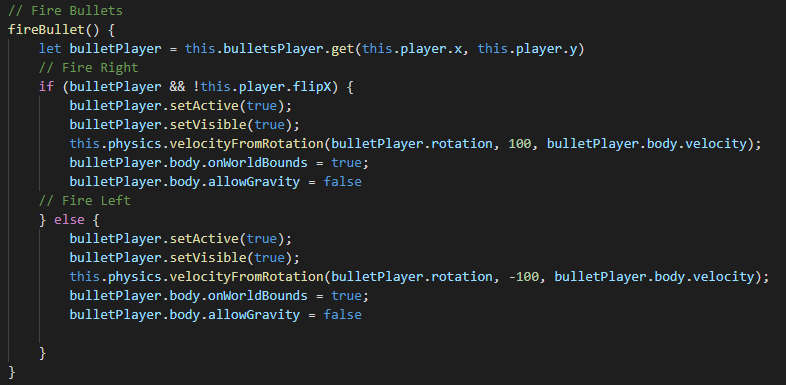
Finally, there are the two functions around how the bullet is fired and how to destroy the object and bring it back to the group pool. First is the “fireBullet” function, which first set “bulletPlayer” to be “bulletsPlayer” by getting the player current position in the game world. This is done to get the bullet group and then spawn one at a time at the player position. After this, we check if player X is flipped or not, as this determines the direction of where the bullet will travel based on the parameter within “velocityFromRotation”. For example, 100 will ensure the bullet will travel right. Upon checking the if statement, we then set the “bulletPlayer” to be active and visible while ensuring that the object is onWorldBound. This is done to allow for collision detection on the bullet once it collides with the world boundary. Finally, there is “allowGravity” set to true, which helps the bullet to stay in the air without falling down to the ground. I may further explore the gravity later to allow the bullet to fall after some time has passed to create some balance to avoid the bullets destroying offscreen enemies and making the gameplay easy to get through.
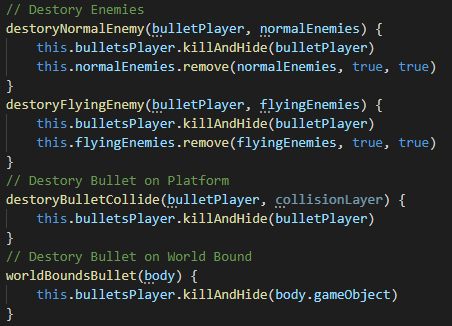
The other function is the process of destroying the bullet based on the collision it collider to. For example, if it collides to a platform, it will simply kill and hide the object and return to the group pool. However, if it collides over the enemy, it will also remove the overlapped enemy simultaneously. While the method to destroy the enemy is simple enough, I would like to make each enemy have health points before being killed, making the gameplay more challenging. However, this may require more time to look into, and my focus is currently creating more weapon types for the player to allow the game to have more features to try out.
Overall, the progress on the project is going very well so far to where the basic mechanic have been fully created. The next parts to focus on are getting the instruction displayed before starting the game and creating an end game screen once the player has collected the key and reached the exit. After this, proper placement on the UI will need to be arranged more such as the text being better around displaying the player current score and their health and having an ammo counter of how many times the player can fire before they run out of ammo. As mentioned before, I will want to make more weapon types for the project, such as a rapid-fire weapon and a shotgun that spread bullets to create different strategies around the gameplay. To show what the game currently looks like, here is a screenshot of the project so far.

Bibliography:
Bulj, N (2020) Basic 16×16 Platformer Tileset. Available at: https://nb264.itch.io/basic-platformer-tileset (Accessed 14 November 2021.)
Cedfelt (2016) Tiny Space Explorer. Available at: https://opengameart.org/content/tiny-space-explorer (Accessed 14 November 2021.)
Photon Storm (2021) Bullets. Available at: https://phaser.io/examples/v3/view/pools/bullets (Accessed 14 November 2021.)