Welcome to Week 4 on the 2D format games project. Previously, I researched a new technical skill known as Pathfinding, which allows game objects to plan out a path toward getting to their destination and getting there. Also, with the research done on the topic, the basic implementation of the mechanic was made to the current project and is now in a current playable state.
With the pathfinding mechanics entirely created, the subsequent plans around the project were to start customising several different game mechanics ideas. Last week, what came to mind was to make a survival-based game with the player having to shoot enemies to earn points. With reaching a specific score value, the player can get to new waves that feature more enemies to spawn to make the game more challenging. If the player is doing well by not taking too much damage, they can be rewarded double and triple points until they take damage. I wanted to experiment with this idea as this would improve my skills to make specific game mechanics, but it is also a particular game genre type I enjoy too.
Since I know how to mechanic work for killing enemies off and the shooting mechanic, it was a matter of getting a score and wave mechanic working for the game. To start with, I first declare four different number variables: “score”, “wave”, “scoreMultiplier” and “comboKills”. “Score” is used to hold the number of points the player has, while the “wave” is used to keep track of what wave the player is on and allows for specific conditions to be met later to spawn more enemies on the game world. While these two variables are essential to getting the basic survival-based made, “scoreMultiplier and “comboKills”. These are used to enhance the score mechanic further to reward more points should the player perform very well in the game such as not taking damage for a while.
In the function of “bulletHitEnemy” (Figure 1), I expanded this further by adding a section of “Combo Increase” and “Reward Score Point”. Whenever this function is called on, these lines of code will first increase the comboKills by 1 and check the current “scoreMultiplier” that the player has. For example if the player “scoreMultiplier” happens to be 3, the player score is added to reflect the score value being tripled. There is a line of code that checks if the wave is higher than one. The reason for this is to prevent specific bugs where enemies would stop spawning after killing the first enemy in the game.

With the changes expanded, I next needed to add some conditional statements in the “update” function (Figure 2). These would control when to increase the score multiplier and the wave based when the player has achieved enough combo kills and score points. For example, how the conditions work with changing the wave is that when the player has achieved a score of 5 or more, the wave number will be set to 2 and update the UI. However, an extra condition is also used to check if the “maxEnemies” is less than two, and if it is, this will then spawn an additional enemy to fight against and increase that value to prevent more enemies from spawning. While this approach works for what I have in mind, it could do with further improvements, such as delaying the spawn. This benefit later allows the player to adjust their skills whenever moving to a new wave.

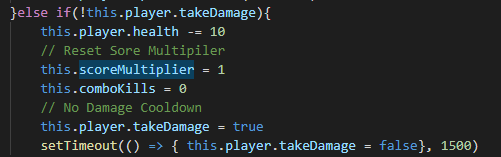
Lastly, there is the combo kill mechanic I had not yet discussed in this work. So, whenever the player collides with the enemy, they will take damage. Then a timeout is also used to resetting when the player can retake damage. However, some additional changes (Figure 3) are made within this part of the function where taking damage will also reset the “scoreMultiplier” and “comboKill” back to their original values. These works as a means to punish the player should they at any point take damage and encourage them to try their best to avoid this.
After creating the mechanics behind the score and wave, I tested these out after completion. While they do work very well, they could do with finding a means to make somehow this repeat endless. This would benefit to creating an endless gameplay for the player since the current version only goes up to wave 4. The improvement done on this in the future would also further challenge to the overall game.
With some spare time, I wanted to improve my UI skills further. In my tank project, I created some animated bars that would reflect how much health the player had in the game. While that attempt was not perfect, I researched to see how the techniques could be done and while I did not find too much information on this, however, I did find a source code on GitHub which contained a class to add a new bar to the game (Figure 4).

What this class does is that it creates a bar by setting the location on the x and y and the size of the width and height. This is followed by setting a max value of how much value the bar can hold and then the colour of the bar and the border itself. Also, there is an additional function in the class that works to set the maximum value of the bar and the current value the bar should be. For example, I experimented with this by getting the player health as the max value and updating the value on the bar based on the current player health during the game. With this, the UI bar worked very well due to learning how the entire code class worked and knowing how to use it.
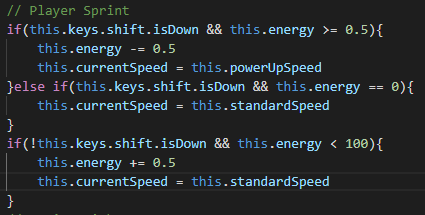
One final bit on the project I worked on was implementing a Sprint mechanic where the player can move faster for a short time (Figure 5). This is affected by the amount of energy the player has during the game, and the energy does regenerate over time whenever they are not sprinting. How the code works is that when the player holds the shift key, their “currentspeed” is then set to “powerspeed” which is a higher movement speed. Also, energy is consumed by 0.5 as long as the key is held down. If the key is held down when energy is equal to zero, their speed will be reset back to default, and the player must let the key go to recover the energy back. This is restored by 0.5 as long as shift is not held down. The current issue with this piece of mechanic so far is that energy is consumed even if no movement is made at all. This could be addressed by adding additional conditions to the code to check if the player is pressing any movement keys.
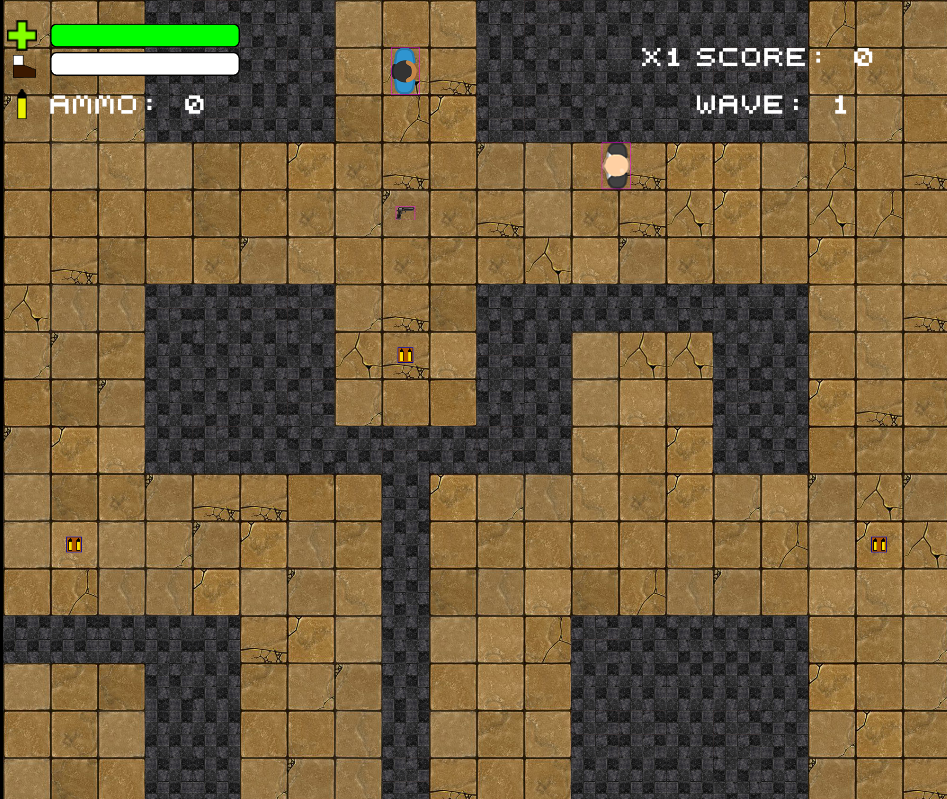
Overall, the project turned out very well toward what I wanted to achieve. There were some other ideas I had in mind to do with this project, such as having respawnable ammo pick up. However, this would have required me to think more about how I could get this mechanic to work. I could see this working by following some of the approaches made by the enemy respawn mechanic and making different adjustments during the process. Either way, with how the score, wave and sprint mechanic work, these turned out very well for the game and could be useful for future projects based on the survival game. The screenshot below shows the finished game.
You can play a version of the game project by clicking the LINK.
Bibliography:
stupidzombie (2020), Phaser 3 UI. Available at: https://github.com/stupidzombie/Phaser-3-UI (Accessed 2 February 2022.)